How to Add Your Name in Desktop Context Menu in Windows 11 - TZ Store

How to Add Your Name in Desktop Context Menu in Windows 11

How to Add Your Name in Desktop Context Menu in Windows 11


How to Add Your Name in Desktop Context Menu in Windows 11

Add Your Name in Top of Desktop Context Menu in Windows 11

Add Your Name in Top of Desktop Context Menu in Windows 11 Code

Windows Registry Editor Version 5.00 [HKEY_CLASSES_ROOT\DesktopBackground\Shell\name] @="Techno Zaibi" "Icon"="imageres.dll,83" "Position"="Top" [HKEY_CLASSES_ROOT\DesktopBackground\Shell\name\command] @="Control userpasswords"
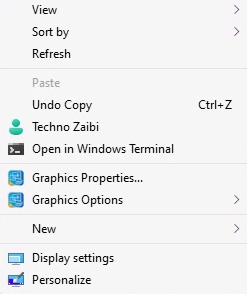
Add Your Name in Center of Desktop Context Menu in Windows 11

Add Your Name in Center of Desktop Context Menu in Windows 11 Code

Windows Registry Editor Version 5.00 [HKEY_CLASSES_ROOT\DesktopBackground\Shell\name] @="Techno Zaibi" "Icon"="imageres.dll,83" "Position"="Center" [HKEY_CLASSES_ROOT\DesktopBackground\Shell\name\command] @="Control userpasswords"

Add Your Name in Bottom of Desktop Context Menu in Windows 11

Add Your Name in Bottom of Desktop Context Menu in Windows 11 Code

Windows Registry Editor Version 5.00 [HKEY_CLASSES_ROOT\DesktopBackground\Shell\name] @="Techno Zaibi" "Icon"="imageres.dll,83" "Position"="Bottom" [HKEY_CLASSES_ROOT\DesktopBackground\Shell\name\command] @="Control userpasswords"

Post a Comment

Cookie Consent
We serve cookies on this site to analyze traffic, remember your preferences, and optimize your experience.
Oops!
It seems there is something wrong with your internet connection. Please connect to the internet and start browsing again.
AdBlock Detected!
We have detected that you are using adblocking plugin in your browser.
The revenue we earn by the advertisements is used to manage this website, we request you to whitelist our website in your adblocking plugin.
Site is Blocked
Sorry! This site is not available in your country.
NextGen Digital Welcome to WhatsApp chat
Howdy! How can we help you today?
Type here...